This article from blog:
http://forum.gns3.net/topic2873.html
http://forum.gns3.net/topic4197.html
Thanks for rednectar.
----------------------------------------------------------------
The Illusive Art of Acquiring A Good Idle-PC Value
----------------------------------------------------------------
One of the most difficult problems new users have to come to grips with when starting out with GNS3 is the concept of an Idle-PC.
Get it right, and you will have a great GNS3 experience. Try to ignore it, and you will be forever miserable.
Here is my tedious and time consuming method of finding a good idle-pc value.
REPEAT FOR EVERY DIFFERENT IOS IMAGE YOU WISH TO RUN ON YOUR SYSTEM:
2011/12/02

How to minimize CPU utilization when using Dynamips/GNS3 (idlepc + idlemax)
This article from blog: http://journeyofanetworkengineer.blogspot.com/2010/12/how-to-minimize-cpu-usage-when-using.html#!/2010/12/how-to-minimize-cpu-usage-when-using.html
Thanks for NE.
And other ref blog is: Drastically decreasing CPU load in Dynamips
http://lostintransit.se/2011/05/16/drastically-decreasing-cpu-load-in-dynamips/
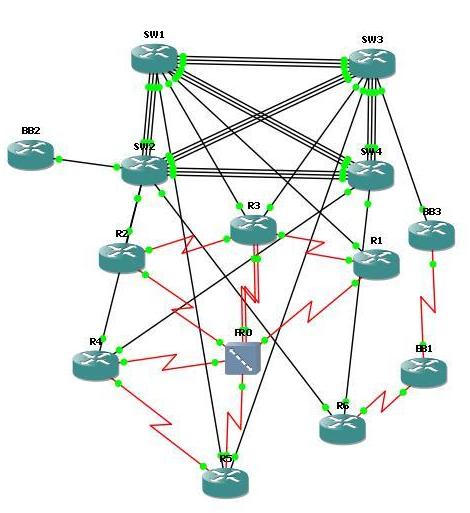
Thanks for NE.
And other ref blog is: Drastically decreasing CPU load in Dynamips
http://lostintransit.se/2011/05/16/drastically-decreasing-cpu-load-in-dynamips/
This is my experiment in minimizing the CPU usage when working on GNS3/Dynamips. On this experiment I have use the Internetwork Expert Topology (INE) Version 5 which has 13 routers and uses 3725 IOS images.
If you need the topology just visit INE Website.
GNS3 Show %CDP-4-DUPLEX_MISMATCH
This article from blog: http://myciscolabs.blogspot.com/2011/09/gns3-duplex-mismatch-messages.html
Thanks for Cisco Freak.
When Cisco devices are connected to one another and CDP is enabled (which it is by default), if one port is configured as full duplex but the other is configured as half duplex, the two devices will log "duplex mismatch" messages. This can be very helpful in the real world. However, when using GNS3 these messages can appear for no reason at all, and they will constantly reappear, over and over again. Things get worse when you've got one router connected to two others, as was the case in the example below:
01:43:20.579: %CDP-4-DUPLEX_MISMATCH: duplex mismatch discovered on FastEthernet1/0 (not half duplex), with R1 FastEthernet0/0 (half duplex).
Thanks for Cisco Freak.
When Cisco devices are connected to one another and CDP is enabled (which it is by default), if one port is configured as full duplex but the other is configured as half duplex, the two devices will log "duplex mismatch" messages. This can be very helpful in the real world. However, when using GNS3 these messages can appear for no reason at all, and they will constantly reappear, over and over again. Things get worse when you've got one router connected to two others, as was the case in the example below:
01:43:20.579: %CDP-4-DUPLEX_MISMATCH: duplex mismatch discovered on FastEthernet1/0 (not half duplex), with R1 FastEthernet0/0 (half duplex).
2011/11/19
無線網路50M/5M大作戰 ~ 802.11n 1000mW - SAPIDO傻多 RB-1733 - 遠距110m測試 - part 2
前兩周測試過傻多之後, 調整了天線的位置.
Finally, we had some results shown at below:

Finally, we had some results shown at below:

2011/11/08
Nexus 7000 F2-Series Module Announce
Cisco Announce New Nexus 7000 F2 Module.
http://www.cisco.com/en/US/prod/collateral/switches/ps9441/ps9402/data_sheet_c78-685394.html
And NX-OS 6.0 release
http://www.cisco.com/en/US/docs/switches/datacenter/sw/6_x/nx-os/release/notes/60_nx-os_release_note.html
Cisco NX-OS Release 6.0 supports the following new hardware:
F2 Module Function:
48-Port 1 and 10 Gigabit Ethernet(Interface flexibility with SFP and SFP+ support)
Comprehensive Layer 2 and Layer 3 capabilities
Support for Cisco Nexus 2000 Series
FCoE support
Online insertion and removal (OIR)
F2 has 48 ports 1G/10G at linerate (=480G), which requires five FAB2 (5 x 110 = 550G).
But when you "Integrating F2-Series Modules Into a Cisco Nexus 7000 Series System"
You should notice at relese NX-OS 6.0:
http://www.cisco.com/en/US/prod/collateral/switches/ps9441/ps9402/data_sheet_c78-685394.html
And NX-OS 6.0 release
http://www.cisco.com/en/US/docs/switches/datacenter/sw/6_x/nx-os/release/notes/60_nx-os_release_note.html
Cisco NX-OS Release 6.0 supports the following new hardware:
• N7K-F248XP-25, 48 port 1/10 Gigabit Ethernet SFP+ F2-series I/O module
N7K-F248XP-25, 48 port 1/10 Gigabit Ethernet SFP+ F2-series I/O module•N7K-C7010-FAB-2, Fabric 2 module for the Cisco Nexus 7000 10-Slot Chassis (N7K-C7010)
N7K-C7010-FAB-2, Fabric 2 module for the Cisco Nexus 7000 10-Slot Chassis (N7K-C7010)•N7K-C7018-FAB-2, Fabric 2 module for the Cisco Nexus 7000 18-Slot Chassis (N7K-C7018)
N7K-C7018-FAB-2, Fabric 2 module for the Cisco Nexus 7000 18-Slot Chassis (N7K-C7018)F2 Module Function:
48-Port 1 and 10 Gigabit Ethernet(Interface flexibility with SFP and SFP+ support)
Comprehensive Layer 2 and Layer 3 capabilities
Support for Cisco Nexus 2000 Series
FCoE support
Online insertion and removal (OIR)
F2 has 48 ports 1G/10G at linerate (=480G), which requires five FAB2 (5 x 110 = 550G).
But when you "Integrating F2-Series Modules Into a Cisco Nexus 7000 Series System"
You should notice at relese NX-OS 6.0:
•An F2-Series module requires its own F2-Series module VDC. This VDC is restricted to the F2-Series module; M1 and F1 ports cannot be in the F2-Series module VDC. The default VDC can also be configured as an F2-Series module VDC.
An F2-Series module requires its own F2-Series module VDC. This VDC is restricted to the F2-Series module; M1 and F1 ports cannot be in the F2-Series module VDC. The default VDC can also be configured as an F2-Series module VDC.•If you boot up an unconfigured Cisco Nexus 7000 Series switch that contains only F2-Series modules, then the default VDC is automatically configured as an F2-Series module VDC.
If you boot up an unconfigured Cisco Nexus 7000 Series switch that contains only F2-Series modules, then the default VDC is automatically configured as an F2-Series module VDC.•Some software features are not available on the F2-Series module in Cisco NX-OS Release 6.0(1). These include ACL Capture, ERSPAN, FCoE, GRE tunnels, LISP, MACSEC, MPLS, Netflow, online diagnostics, OTV, PIM-Bidir, and certain counters. Many of these features will be supported in future software releases; however, the F2-Series hardware does not support LISP, MPLS, and OTV, so these features will remain unavailable on the F2-Series module.
Some software features are not available on the F2-Series module in Cisco NX-OS Release 6.0(1). These include ACL Capture, ERSPAN, FCoE, GRE tunnels, LISP, MACSEC, MPLS, Netflow, online diagnostics, OTV, PIM-Bidir, and certain counters. Many of these features will be supported in future software releases; however, the F2-Series hardware does not support LISP, MPLS, and OTV, so these features will remain unavailable on the F2-Series module.Additional Resources:
2011/11/05
無線網路50M/5M大作戰 ~ 802.11n 1000mW - SAPIDO傻多 RB-1733 - 遠距110m測試 - part 1

最近因為家中網路出口端從10M/2M升級至50M/5M的光纖網路, 原本的D-Link AP(11g)做Repeat Mode已經不敷使用, 同時要面對長距離110m及大頻寬的網路需求只有再一次作戰囉~~
這是兩地的地形圖, 但是左邊房屋位於三樓(Edge User), 右邊房屋位於十樓(Internet 50M/5M進線位置), 直線目視距離約110m左右吧~


簡單的網路架構大約是這樣, 有點懶的畫, 以後再補吧~~
PC------via網路線------(傻多)------------via 110m Wireless----------------(傻多) ------via網路線------Internet 50M/5M
2011/11/04
Cisco Trade Tool - CCO Login Required
If you have Cisco devices or some HWIC cards, and you get serial number.
But you could not make sure what module or Part-Number it is.
Then you could use this tools.
Cisco Trade Tool - Login Required

But you could not make sure what module or Part-Number it is.
Then you could use this tools.
Cisco Trade Tool - Login Required
Cisco Nexus 5000/7000 FEX Topologies
If you want know Cisco Nexus 5K/7K FEX topology , you should look this blog:
http://jeremywaldrop.wordpress.com/2011/06/30/cisco-nexus-50007000-fex-topologies/
and thanks Jeremy Blog.
http://jeremywaldrop.wordpress.com/2011/06/30/cisco-nexus-50007000-fex-topologies/
and thanks Jeremy Blog.
訂閱:
文章 (Atom)